

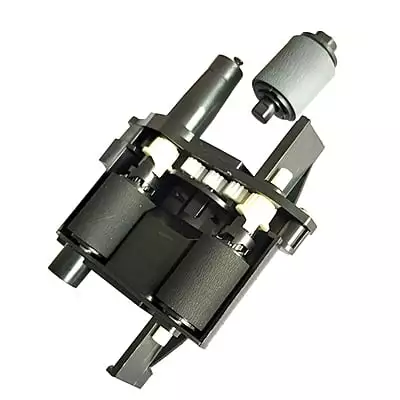
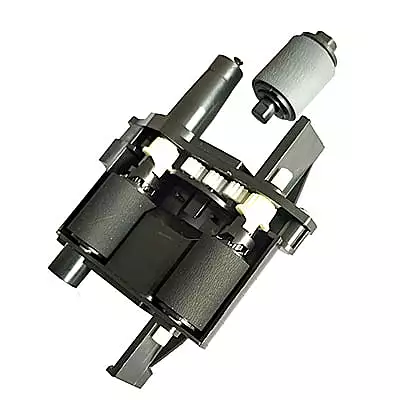
ADF Roller Kit For HP Scanjet Pro 2500 S1 2500 F1 Scanner Printer (L2747-60001)
Customize
Product Details
HP ADF Roller Kit – Premium Replacement for ScanJet Pro Scanners
The HP ADF roller kit ensures smooth document feeding in your scanner. Moreover, this import quality kit handles automatic document feeder mechanisms efficiently. Consequently, your HP ScanJet Pro depends on these rollers for reliable performance.
What is an HP ADF Roller Kit?
Understanding the Component
The HP ADF roller kit contains essential pickup and feed rollers. Specifically, these rollers grab documents from the input tray accurately. Therefore, the kit maintains consistent paper handling throughout scanning operations.
Kit Components
Furthermore, this kit includes pickup rollers and retard rollers together. Additionally, each component serves a specific function in document feeding. Consequently, working together, they prevent jams and misfeeds effectively.
Quality Standards
Moreover, import quality construction ensures reliable long-term performance consistently. Furthermore, new materials provide optimal grip and durability throughout use. Therefore, your scanner operates at peak efficiency with these rollers.
How the HP 2500 S1 Pickup Roller Works
Document Pickup Process
The HP 2500 S1 pickup roller grabs documents from the feeder tray. Subsequently, pickup rollers use friction to separate individual sheets precisely. Consequently, each page enters the scanner path smoothly and accurately.
Paper Separation
Furthermore, retard rollers prevent multiple pages from feeding simultaneously. Moreover, this separation mechanism ensures single-sheet scanning always. Therefore, document integrity remains protected throughout the scanning process.
Feed Mechanism
Additionally, feed rollers move documents through the scanner path steadily. Meanwhile, consistent speed prevents image distortion during scanning operations. Consequently, the HP 2500 S1 pickup roller maintains uniform document movement.
Signs Your HP ADF Roller Kit Needs Replacement
Paper Feeding Issues
Initially, watch for these indicators of roller wear:
- Firstly, documents jamming frequently in the feeder
- Secondly, multiple pages feeding together simultaneously
- Additionally, skewed or crooked document alignment issues
- Finally, pages not picking up from the tray
Performance Problems
Furthermore, additional warning signs include:
- Moreover, unusual noises during document feeding operations
- Additionally, inconsistent scanning speeds during operation
- Furthermore, visible wear on roller surfaces appearing
- Finally, decreased grip on paper edges noticed
When to Replace
Consequently, these symptoms indicate roller kit replacement needs immediately. Therefore, prompt action restores scanner reliability without delay. Otherwise, delaying replacement may cause further feeding problems.
Benefits of HP ADF Roller Kit
Premium Performance Features
This HP ADF roller kit delivers exceptional document handling consistently. Moreover, import quality ensures reliable operation under heavy use. Consequently, your scans maintain professional quality throughout.
Key Advantages
Additionally, key advantages include:
- Firstly, restores smooth document pickup operation instantly
- Secondly, eliminates paper jams and misfeeds completely
- Furthermore, ensures accurate single-sheet separation always
- Moreover, compatible with HP ScanJet Pro 2500 series
- Finally, backed by 15-day replacement warranty
Compatible Models
HP ScanJet Pro 2500 Series
| Brand | Series | Compatible Models |
|---|---|---|
| HP | ScanJet Pro | 2500 f1 Flatbed Scanner |
| HP | ScanJet Pro | 2500 fn1 Flatbed Scanner |
Additional Compatibility
| Brand | Series | Notes |
|---|---|---|
| HP | ScanJet Pro 2000 Series | Confirm dimensions before purchase |
Product Specifications
| Specification | Details |
|---|---|
| Part Number | L2748A |
| Product Type | Pickup Roller / ADF Pickup Roller Kit |
| Also Known As | ADF Roller Kit, Auto Document Feeder Roller, Roller Replacement Kit, Exchange Roller, Retard Roller, Feed Roller |
| Condition | Import Quality |
| Warranty | 15 Days Replacement Warranty |
Installation Guidelines for HP 2500 S1 Pickup Roller
Preparation Steps
Installing the HP 2500 S1 pickup roller requires careful handling throughout. First, power off your scanner before beginning any work. Then, open the scanner cover to access roller compartments.
Removal Process
Next, locate the existing rollers inside the scanner unit. Afterward, release the roller locks or clips very carefully. Subsequently, remove worn rollers from their mounting positions gently.
Installation Process
Then, insert new pickup rollers into correct positions securely. Moreover, secure retard rollers in their designated slots properly. Finally, close all locks and covers after completing installation.
Testing Procedure
Afterward, power on the scanner after completing reassembly fully. Then, run test scans with multiple document types immediately. Finally, verify smooth feeding without jams or errors occurring.
Why Choose This HP ADF Roller Kit?
Quality Assurance
Importantly, import quality components meet strict performance standards consistently. Furthermore, new materials ensure extended operational lifespan for scanners. Consequently, your investment delivers reliable long-term value.
Scanner Performance
Moreover, proper roller function produces superior scanning results always. Additionally, the HP 2500 S1 pickup roller maintains consistency throughout operation. Therefore, professional results require quality replacement components.
Order Your Replacement Today
Therefore, restore your HP scanner's optimal performance right now. Moreover, this quality roller kit ships ready for installation. Finally, contact our team for compatibility questions or support.